Overview
Introduction: What This Custom Bundle Collection Template Is
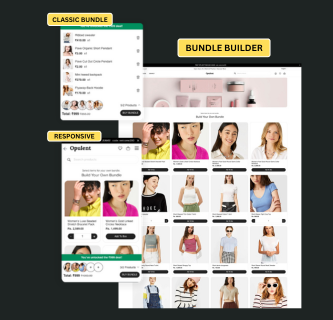
This documentation explains how to build and manage a custom bundle offer system on Shopify using a collection template, without relying on third-party bundle apps. The purpose of this setup is to allow merchants to create offer-specific collection pages such as Buy 5 items for ₹599, Buy 2 Get 2, or similar mix-and-match deals, while staying fully compatible with Shopify’s native checkout and discount system.
The entire bundle experience is implemented using a single custom Shopify section file. This file contains all required frontend logic and presentation, including Liquid markup, HTML structure, CSS styling, JavaScript behavior, and the section schema that exposes settings inside the Shopify theme editor. Keeping everything in one section makes the system easier to manage, reuse, and customize across different bundle offers.
It is important to understand from the beginning that this bundle system focuses only on the frontend experience. Product selection, validation, UI messaging, and add-to-cart behavior are handled by the section. The actual price reduction at checkout is handled separately using Shopify’s built-in discount engine. This separation is intentional and follows Shopify best practices.
Adding the Custom Bundle Section to Your Shopify Theme
The first technical step is to add your custom bundle section file to the Shopify theme. This section will later be placed inside a dedicated bundle collection template.
To do this, open your Shopify admin and navigate to Online Store → Themes. On your active theme, open the Edit code option. Inside the code editor, locate the Sections directory in the left sidebar.
Now create a new section file. Use a clear and descriptive name such as:
bundle-builder.liquid
Open this newly created file and paste your complete bundle section code into it. This file should already contain all necessary logic and schema definitions.
{% liquid
assign current_filter_size = 0
for filter in collection.filters
assign current_filter_size = current_filter_size | plus: filter.active_values.size
endfor
%}
<div class="bundle-builder-section" data-section-id="{{ section.id }}" data-section-type="bundle-builder">
<div class="wrapper">
<div class="bundle-builder-container container-fluid">
<!-- Product Grid -->
<div class="bundle-builder-grid">
{% paginate collection.products by 50 %}
<div class=" grid--uniform grid--equal-height">
{% for product in collection.products %}
{% liquid
if section.settings.per_row == 2
assign desktop_width = '50%'
elsif section.settings.per_row == 3
assign desktop_width = '33.333%'
elsif section.settings.per_row == 4
assign desktop_width = '25%'
elsif section.settings.per_row == 5
assign desktop_width = '20%'
else
assign desktop_width = '25%'
endif
%}
<div class="grid__item grid__item--bundle-product"
style="width: {{ desktop_width }};">
<div class="bundle-product-card" data-product-id="{{ product.id }}" data-variant-id="{{ product.selected_or_first_available_variant.id }}" data-product-handle="{{ product.handle }}" data-product-title="{{ product.title }}" data-product-price="{{ product.price | money_without_currency }}" data-product-image="{{ product.featured_image | img_url: '200x' }}">
{% if product.metafields.custom.product_badge and settings.badge_enable %}
{% liquid
assign badge_text = product.metafields.custom.product_badge | downcase
assign badge_type = 'custom'
if badge_text contains 'sale' or badge_text contains 'off' or badge_text contains 'discount'
assign badge_type = 'sale'
elsif badge_text contains 'new' or badge_text contains 'latest'
assign badge_type = 'new'
endif
%}
<div class="bundle-product-card__badge" data-badge-type="{{ badge_type }}">
{{ product.metafields.custom.product_badge }}
</div>
{% endif %}
<div class="bundle-product-card__image" data-product-link="{{ product.url }}">
<img src="{{ product.featured_image | image_url }}" alt="{{ product.title }}" width="100%" height="100%">
</div>
<div class="bundle-product-card__info">
<div class="bundle-product-card__content">
<h3 class="bundle-product-card__title" data-product-link="{{ product.url }}">{{ product.title }}</h3>
<div class="bundle-product-card__price">{{ product.price | money }}</div>
</div>
</div>
<div class="bundle-product-card__actions">
<button class="btn bundle-product-card__add" data-add-to-box>Add To Box</button>
<div class="bundle-product-card__quantity" style="display: none;">
<button class="bundle-quantity-button" data-quantity-decrease>-</button>
<input type="number" class="bundle-quantity-input" value="1" min="0" max="99" readonly data-quantity-input>
<button class="bundle-quantity-button" data-quantity-increase>+</button>
</div>
</div>
</div>
</div>
{% endfor %}
</div>
{% if paginate.pages > 1 %}
{% render 'pagination', paginate: paginate %}
{% endif %}
{% endpaginate %}
</div>
</div>
</div>
<!-- Sticky Bundle Bar -->
<div class="bundle-bar" data-bundle-bar>
<div class="bundle-bar__container">
<div class="bundle-bar__message">
<span data-bundle-message>
{% capture bundle_text %}
{{ section.settings.bundle_text }}
{% endcapture %}
{% assign bundle_text_with_min = bundle_text | strip | replace: "{min}", section.settings.min_products %}
{% assign bundle_text_final = bundle_text_with_min | replace: "{price}", section.settings.deal_price %}
{{ bundle_text_final }}
</span>
</div>
<div class="bundle-bar__expanded" data-bundle-expanded style="display: none;">
<div class="bundle-expanded__products" data-bundle-expanded-products>
<!-- Products will be populated here dynamically -->
</div>
</div>
<div class="bundle-bar__content">
<div class="bundle-bar__slots">
{% for i in (1..section.settings.max_products) %}
<div class="bundle-bar__slot" data-bundle-slot="{{ forloop.index0 }}">
<div class="bundle-bar__slot-placeholder">+</div>
<div class="bundle-bar__slot-image" style="display: none;">
<img src="" alt="">
</div>
</div>
{% endfor %}
</div>
<div class="bundle-bar__info">
<div class="bundle-bar__counter">
<span data-bundle-count>0</span>/<span data-bundle-max>{{ section.settings.min_products }}</span> Products
<span class="bundle-bar__toggle" data-bundle-toggle>
<img width="50" height="50" src="https://img.icons8.com/ios/50/expand-arrow--v1.png" alt="expand-arrow--v1" style="
width: 12px;
height: 12px;"/>
</span>
</div>
<div class="bundle-bar__price">
Total: <span data-bundle-total>{{ 0 | money }}</span>
</div>
</div>
<div class="bundle-bar__action">
<div class="bundle-bar__counter bundle-bar__counter--mobile" style="display: none;">
<span data-bundle-count-mobile>0</span>/<span data-bundle-max-mobile>{{ section.settings.min_products }}</span> Products
<span class="bundle-bar__toggle" data-bundle-toggle>
<img width="50" height="50" src="https://img.icons8.com/ios/50/expand-arrow--v1.png" alt="expand-arrow--v1" style="
width: 12px;
height: 12px;"/>
</span>
</div>
<button class="btn btn--bundle-buy" data-bundle-buy>BUY BUNDLE</button>
</div>
</div>
</div>
</div>
</div>
<style>
/* Desktop Typography */
.bundle-builder-section {
font-family: {{ section.settings.desktop_font_family.family }}, {{ section.settings.desktop_font_family.fallback_families }};
}
.bundle-builder-section {
position: relative;
padding-bottom: 100px;
}
.bundle-product-card {
border-radius: {{ section.settings.product_border_radius }}px;
overflow: hidden;
background: {{ section.settings.product_bg_color }};
border: 1px solid #e1e0e0;
transition: all 0.3s ease;
display: flex;
flex-direction: column;
height: 100%;
width: 100%;
position: relative;
}
.bundle-product-card__badge {
position: absolute;
{% if settings.badge_position == 'top-left' %}
top: {{ settings.badge_offset_top }}px;
left: {{ settings.badge_offset_side }}px;
{% elsif settings.badge_position == 'top-right' %}
top: {{ settings.badge_offset_top }}px;
right: {{ settings.badge_offset_side }}px;
{% elsif settings.badge_position == 'bottom-left' %}
bottom: {{ settings.badge_offset_top }}px;
left: {{ settings.badge_offset_side }}px;
{% else %}
bottom: {{ settings.badge_offset_top }}px;
right: {{ settings.badge_offset_side }}px;
{% endif %}
background: {{ settings.badge_custom_bg_color }};
color: {{ settings.badge_custom_text_color }};
padding: {{ settings.badge_padding_vertical }}px {{ settings.badge_padding_horizontal }}px;
border-radius: {{ settings.badge_border_radius }}px;
font-size: {{ settings.badge_font_size }}px;
font-weight: {{ settings.badge_font_weight }};
text-transform: uppercase;
letter-spacing: 0.5px;
z-index: 2;
box-shadow: 0 2px 4px rgba(0,0,0,0.1);
}
/* Badge type specific colors */
.bundle-product-card__badge[data-badge-type="sale"] {
background: {{ settings.badge_sale_bg_color }};
color: {{ settings.badge_sale_text_color }};
}
.bundle-product-card__badge[data-badge-type="new"] {
background: {{ settings.badge_new_bg_color }};
color: {{ settings.badge_new_text_color }};
}
.bundle-product-card__badge[data-badge-type="custom"] {
background: {{ settings.badge_custom_bg_color }};
color: {{ settings.badge_custom_text_color }};
}
.btn.bundle-product-card__add,
.btn.btn--bundle-buy {
background-color: {{ section.settings.button_color }};
color: {{ section.settings.button_text_color }};
border-radius: {{ section.settings.desktop_button_border_radius }}px;
font-size: {{ section.settings.desktop_button_font_size }}px;
font-weight: {{ section.settings.desktop_button_font_weight }};
font-family: {{ section.settings.desktop_font_family.family }}, {{ section.settings.desktop_font_family.fallback_families }};
line-height: {{ section.settings.desktop_button_line_height }};
letter-spacing: {{ section.settings.desktop_button_letter_spacing }}px;
text-transform: {{ section.settings.desktop_button_text_transform }};
padding: {{ section.settings.desktop_button_padding_vertical }}px {{ section.settings.desktop_button_padding_horizontal }}px;
}
.bundle-product-card__image {
position: relative;
padding-top: 100%;
overflow: hidden;
cursor: pointer;
transition: transform 0.2s ease;
}
.bundle-product-card__image img {
position: absolute;
top: 0;
left: 0;
width: 100%;
height: 100%;
object-fit: cover;
}
.bundle-product-card__info {
padding: 15px;
flex-grow: 1;
display: flex;
flex-direction: column;
}
.bundle-product-card__content {
flex-grow: 1;
}
.bundle-product-card__title {
font-size: {{ section.settings.desktop_title_font_size }}px;
margin: 0 0 5px;
font-weight: {{ section.settings.desktop_title_font_weight }};
font-family: {{ section.settings.desktop_font_family.family }}, {{ section.settings.desktop_font_family.fallback_families }};
line-height: {{ section.settings.desktop_title_line_height }};
letter-spacing: {{ section.settings.desktop_title_letter_spacing }}px;
text-transform: {{ section.settings.desktop_title_text_transform }};
cursor: pointer;
transition: color 0.2s ease;
}
.bundle-product-card__price {
font-weight: {{ section.settings.desktop_price_font_weight }};
font-size: {{ section.settings.desktop_price_font_size }}px;
font-family: {{ section.settings.desktop_font_family.family }}, {{ section.settings.desktop_font_family.fallback_families }};
line-height: {{ section.settings.desktop_price_line_height }};
letter-spacing: {{ section.settings.desktop_price_letter_spacing }}px;
color: #333;
}
.bundle-product-card__actions {
padding: 0 15px 15px;
}
.bundle-product-card__add {
width: 100%;
background: #8a2be2;
color: white;
border: none;
border-radius: 4px;
padding: 8px 15px;
cursor: pointer;
font-weight: 500;
}
.bundle-product-card__quantity {
display: flex;
align-items: center;
justify-content: space-between;
border: 1px solid #ddd;
overflow: hidden;
}
.bundle-quantity-button {
background: {{ section.settings.button_color }};
color: {{ section.settings.button_text_color }};
border: none;
width: 36px;
height: 38px;
font-size: 18px;
cursor: pointer;
}
.bundle-quantity-input {
border: none !important;
width: 55px;
margin: 0;
text-align: center;
font-size: 16px;
}
/* Grid Equal Height */
.grid--equal-height {
display: flex;
flex-wrap: wrap;
justify-content: center;
margin: 0 -10px;
}
.grid--equal-height .grid__item {
display: flex;
padding: 0 10px;
margin-bottom: 20px;
}
/* Sticky Bundle Bar */
.bundle-bar {
margin-inline-start: auto;
margin-inline-end: auto;
border-start-start-radius: 1rem;
border-start-end-radius: 1rem;
border-end-start-radius: 1rem;
border-end-end-radius: 1rem;
width: 600px;
overflow-x: hidden;
background: #fff;
overflow-y: hidden;
z-index: 999;
position: fixed;
inset-inline-start: 0;
inset-inline-end: 0;
inset-block-end: 3rem;
box-shadow: 0 10px 24px rgba(0, 0, 0, .2);
}
.bundle-bar__toggle {
display: inline-flex;
align-items: center;
justify-content: center;
margin-left: 2px;
cursor: pointer;
transition: transform 0.3s ease;
}
.bundle-bar__toggle.is-active {
transform: rotate(180deg);
}
.bundle-bar__expanded {
width: 100%;
background-color: #fff;
border-top: 1px solid #e8e8e8;
}
.bundle-expanded__products {
display: flex;
flex-direction: column;
gap: 14px;
padding: 14px;
}
.bundle-expanded-item {
display: flex;
align-items: center;
background-color: white;
border-radius: 8px;
}
.bundle-expanded-item__image {
width: 50px;
height: 50px;
object-fit: cover;
border-radius: 4px;
margin-right: 10px;
}
.bundle-expanded-item__info {
flex: 1;
}
.bundle-expanded-item__title {
font-weight: 500;
margin-bottom: 4px;
font-size: 14px;
}
.bundle-expanded-item__price {
font-size: 14px;
font-weight: 700;
}
.bundle-expanded-item__quantity {
margin: 0 5px;
font-weight: 400;
}
.bundle-expanded-item__remove {
cursor: pointer;
color: #999;
transition: color 0.2s;
}
.bundle-expanded-item__remove:hover {
color: #ff5252;
}
/* Toast Notification Styles */
.bundle-toast {
position: fixed;
bottom: 50px;
left: 50%;
transform: translateX(-50%);
background-color: #000;
color: #fff;
padding: 6px 8px;
border-radius: 4px;
z-index: 9999;
font-size: 12px;
text-align: center;
opacity: 0;
visibility: hidden;
transition: opacity 0.3s, visibility 0.3s;
max-width: 90%;
}
.bundle-toast.show {
opacity: 1;
visibility: visible;
}.bundle-bar__container {
background: #e4e4e4;
}
.bundle-bar__message {
text-align: center;
font-weight: 600;
padding: 5px 0;
font-size: 14px;
background-color: {{ section.settings.bundle_bar_color }};
color: {{ section.settings.bundle_bar_text_color }};
}
.bundle-bar__message.unlocked {
background: #008F5D;
}
.bundle-bar__content {
display: flex;
align-items: center;
padding: 1rem;
justify-content: space-between;
}
.bundle-bar__slots {
display: flex;
padding-inline-start: 1rem;
}
.bundle-bar__slot {
margin-inline-start: -12px;
}
.bundle-bar__slot {
width: 40px;
height: 40px;
border-radius: 50%;
background: #fff;
display: flex;
align-items: center;
border: 1px solid #000;
justify-content: center;
position: relative;
}
.bundle-bar__slot-placeholder {
font-size: 20px;
margin-bottom: 2px;
}
.bundle-bar__slot-image {
position: absolute;
top: 0;
left: 0;
width: 100%;
height: 100%;
border-radius: 50%;
overflow: hidden;
}
.bundle-bar__slot-image img {
width: 100%;
height: 100%;
object-fit: cover;
}
.bundle-bar__info {
text-align: center;
font-size: 14px;
line-height: 1.2;
}
.bundle-bar__counter {
font-weight: 500;
margin-bottom: 5px;
}
.bundle-bar__action button.btn.btn--bundle-buy {
border-radius: 30px;
font-size: 12px;
letter-spacing: 2px;
}
.bundle-bar__price {
font-size: 16px;
font-weight: bold;
}
span[data-bundle-total] s {
font-size: 14px;
margin-left: 5px;
font-weight: 400;
color: #696969;
}
.btn--bundle-buy {
background: white;
color: #8a2be2;
border: none;
border-radius: 4px;
padding: 10px 20px;
font-weight: bold;
cursor: pointer;
}
.btn--bundle-buy:disabled {
opacity: 0.7;
cursor: not-allowed;
}
.bundle-product-card__quantity {
border-radius: {{ section.settings.desktop_button_border_radius }}px;
}
@media screen and (min-width: 767px) {
.bundle-builder-container {
padding-top: 3rem;
}}
@media screen and (max-width: 767px) {
/* Force mobile to always show 2 items per row regardless of desktop setting */
.grid__item--bundle-product {
width: 50% !important;
}
.grid--equal-height {
margin: 0 -5px;
}
.grid--equal-height .grid__item {
padding: 0 5px;
margin-bottom: 15px;
}
.bundle-product-card__quantity {
border-radius: {{ section.settings.mobile_button_border_radius }}px;
}
/* Mobile Typography */
.bundle-builder-section {
font-family: {{ section.settings.mobile_font_family.family }}, {{ section.settings.mobile_font_family.fallback_families }};
}
.bundle-product-card__title {
font-size: {{ section.settings.mobile_title_font_size }}px !important;
font-weight: {{ section.settings.mobile_title_font_weight }} !important;
font-family: {{ section.settings.mobile_font_family.family }}, {{ section.settings.mobile_font_family.fallback_families }} !important;
line-height: {{ section.settings.mobile_title_line_height }} !important;
letter-spacing: {{ section.settings.mobile_title_letter_spacing }}px !important;
text-transform: {{ section.settings.mobile_title_text_transform }} !important;
cursor: pointer;
}
.bundle-product-card__image {
cursor: pointer;
}
.bundle-product-card__image:hover {
transform: scale(1.02);
}
.bundle-product-card__price {
font-size: {{ section.settings.mobile_price_font_size }}px !important;
font-weight: {{ section.settings.mobile_price_font_weight }} !important;
font-family: {{ section.settings.mobile_font_family.family }}, {{ section.settings.mobile_font_family.fallback_families }} !important;
line-height: {{ section.settings.mobile_price_line_height }} !important;
letter-spacing: {{ section.settings.mobile_price_letter_spacing }}px !important;
}
.btn.bundle-product-card__add,
.btn.btn--bundle-buy {
font-size: {{ section.settings.mobile_button_font_size }}px !important;
font-weight: {{ section.settings.mobile_button_font_weight }} !important;
font-family: {{ section.settings.mobile_font_family.family }}, {{ section.settings.mobile_font_family.fallback_families }} !important;
line-height: {{ section.settings.mobile_button_line_height }} !important;
letter-spacing: {{ section.settings.mobile_button_letter_spacing }}px !important;
text-transform: {{ section.settings.mobile_button_text_transform }} !important;
border-radius: {{ section.settings.mobile_button_border_radius }}px !important;
padding: {{ section.settings.mobile_button_padding_vertical }}px {{ section.settings.mobile_button_padding_horizontal }}px !important;
}
.bundle-bar {
width: 100%;
border-radius: 0;
bottom: 0;
box-shadow: 0 -2px 10px rgba(0, 0, 0, 0.1);
}
.bundle-bar__container {
background: #fff;
}
.bundle-bar__message {
color: #fff;
padding: 6px 0;
font-size: 14px;
}
.bundle-bar__message.unlocked {
background: #008F5D;
}
.bundle-bar__content {
display: grid;
grid-template-columns: 1fr auto;
grid-template-areas:
"slots action"
"info action";
padding: 10px;
gap: 5px;
align-items: center;
}
.bundle-bar__slots {
grid-area: slots;
padding-inline-start: 0;
justify-content: flex-start;
}
.bundle-bar__info {
grid-area: info;
text-align: left;
margin-top: 5px;
}
.bundle-bar__info .bundle-bar__counter {
display: none !important;
}
.bundle-bar__action {
grid-area: action;
align-self: center;
display: flex;
flex-direction: column;
align-items: center;
gap: 12px;
}
.bundle-bar__action .bundle-bar__counter {
font-size: 14px;
margin-bottom: 0;
order: 1;
display: block !important;
}
.bundle-bar__action .bundle-bar__counter--mobile {
display: block !important;
}
.bundle-bar__action button {
order: 2;
}
.bundle-bar__price {
font-size: 16px;
}
.bundle-bar__price {
padding-bottom: 1rem;
}
.bundle-bar__action button.btn.btn--bundle-buy {
padding: 8px 15px;
font-size: 11px;
}
.bundle-bar__slot {
width: 46px;
height: 46px;
margin-inline-start: -8px;
}
.bundle-bar__slot:first-child {
margin-inline-start: 0;
}
}
@media (max-width: 767px) {
.grid__item--bundle-product {
width: 50% !important;
}
}
</style>
<script>
document.addEventListener('DOMContentLoaded', function() {
var bundleBuilder = {
init: function() {
this.settings = {
minProducts: {{ section.settings.min_products }},
maxProducts: {{ section.settings.max_products }},
dealPrice: "{{ section.settings.deal_price }}",
bundleText: "{{ section.settings.bundle_text }}"
};
this.elements = {
productCards: document.querySelectorAll('.bundle-product-card'),
bundleBar: document.querySelector('[data-bundle-bar]'),
bundleSlots: document.querySelectorAll('[data-bundle-slot]'),
bundleMessage: document.querySelector('[data-bundle-message]'),
bundleCount: document.querySelector('[data-bundle-count]'),
bundleCountMobile: document.querySelector('[data-bundle-count-mobile]'),
bundleMax: document.querySelector('[data-bundle-max]'),
bundleMaxMobile: document.querySelector('[data-bundle-max-mobile]'),
bundleTotal: document.querySelector('[data-bundle-total]'),
bundleBuy: document.querySelector('[data-bundle-buy]'),
bundleToggle: document.querySelectorAll('[data-bundle-toggle]'),
bundleExpanded: document.querySelector('[data-bundle-expanded]'),
expandedProducts: document.querySelector('[data-bundle-expanded-products]')
};
// Try alternative selectors if elements are not found
if (!this.elements.bundleBuy) {
this.elements.bundleBuy = document.querySelector('.btn--bundle-buy, #BuyBundle');
}
// Initialize state
this.state = {
selectedProducts: [],
totalPrice: 0,
isExpanded: false
};
// localStorage key for saving bundle state
this.storageKey = 'bundleBuilder_selectedProducts';
// Load saved state from localStorage
this.loadSavedState();
// Create toast element
this.createToastElement();
// Initialize the bundle bar
this.updateBundleBar();
// Bind all events
this.bindEvents();
},
// Save current state to localStorage
saveState: function() {
try {
localStorage.setItem(this.storageKey, JSON.stringify(this.state.selectedProducts));
} catch (error) {
console.error('Error saving bundle state to localStorage:', error);
}
},
// Load saved state from localStorage
loadSavedState: function() {
try {
const savedProducts = localStorage.getItem(this.storageKey);
if (savedProducts) {
this.state.selectedProducts = JSON.parse(savedProducts);
// Restore UI state for each saved product
this.state.selectedProducts.forEach(product => {
this.restoreProductUI(product);
});
}
} catch (error) {
console.error('Error loading bundle state from localStorage:', error);
// Reset to empty state if there's an error
this.state.selectedProducts = [];
}
},
// Restore UI state for a product
restoreProductUI: function(product) {
const card = document.querySelector(`[data-product-id="${product.id}"]`);
if (card) {
const addButton = card.querySelector('[data-add-to-box]');
const quantitySelector = card.querySelector('.bundle-product-card__quantity');
const quantityInput = card.querySelector('[data-quantity-input]');
// Hide add button, show quantity selector
if (addButton) addButton.style.display = 'none';
if (quantitySelector) quantitySelector.style.display = 'flex';
if (quantityInput) quantityInput.value = product.quantity;
}
},
createToastElement: function() {
// Create a new toast element with more visible styling
var toast = document.createElement('div');
toast.className = 'bundle-toast';
toast.style.position = 'fixed';
toast.style.bottom = '50px';
toast.style.left = '50%';
toast.style.transform = 'translateX(-50%)';
toast.style.backgroundColor = '#000';
toast.style.color = 'white';
toast.style.padding = '6px 8px';
toast.style.borderRadius = '4px';
toast.style.zIndex = '9999';
toast.style.opacity = '0';
toast.style.transition = 'opacity 0.3s ease-in-out';
toast.style.boxShadow = '0 2px 10px rgba(0,0,0,0.2)';
toast.style.fontSize = '12px';
toast.style.fontWeight = 'bold';
toast.style.textAlign = 'center';
toast.style.minWidth = '250px';
// Append to body
document.body.appendChild(toast);
this.toastElement = toast;
},
showToast: function(message, duration) {
// Get the predefined toast element
const toast = document.getElementById('bundle-toast');
const toastMessage = document.getElementById('bundle-toast-message');
if (!toast || !toastMessage) {
console.error('Toast elements not found in the DOM');
return;
}
// Set the message
toastMessage.textContent = message;
// Clear any existing timeouts
clearTimeout(this.toastTimeout);
clearTimeout(this.toastHideTimeout);
// Show the toast
toast.style.display = 'block';
// Force browser reflow
void toast.offsetWidth;
// Fade in
toast.style.opacity = '1';
// Set timeout to hide
this.toastTimeout = setTimeout(() => {
// Fade out
toast.style.opacity = '0';
// Hide after transition completes
this.toastHideTimeout = setTimeout(() => {
toast.style.display = 'none';
}, 300);
}, duration || 3000);
},
bindEvents: function() {
var self = this;
// Product link clicks (title and image)
document.querySelectorAll('[data-product-link]').forEach(function(element) {
element.addEventListener('click', function(e) {
e.preventDefault();
e.stopPropagation();
const productUrl = this.getAttribute('data-product-link');
if (productUrl) {
window.location.href = productUrl;
}
});
});
// Add to box buttons
document.querySelectorAll('[data-add-to-box]').forEach(function(button) {
button.addEventListener('click', function(e) {
e.preventDefault();
e.stopPropagation();
var card = e.target.closest('.bundle-product-card');
self.addProductToBox(card);
});
});
// Quantity buttons
document.querySelectorAll('[data-quantity-increase]').forEach(function(button) {
button.addEventListener('click', function(e) {
var card = e.target.closest('.bundle-product-card');
var input = card.querySelector('[data-quantity-input]');
var currentValue = parseInt(input.value);
input.value = currentValue + 1;
self.updateProductQuantity(card, currentValue + 1);
});
});
document.querySelectorAll('[data-quantity-decrease]').forEach(function(button) {
button.addEventListener('click', function(e) {
var card = e.target.closest('.bundle-product-card');
var input = card.querySelector('[data-quantity-input]');
var currentValue = parseInt(input.value);
if (currentValue > 0) {
input.value = currentValue - 1;
self.updateProductQuantity(card, currentValue - 1);
}
});
});
// Buy bundle button
if (this.elements.bundleBuy) {
this.elements.bundleBuy.addEventListener('click', function(e) {
// Check if minimum products requirement is met
let totalProducts = 0;
self.state.selectedProducts.forEach(product => {
totalProducts += product.quantity;
});
if (totalProducts < self.settings.minProducts) {
const remaining = self.settings.minProducts - totalProducts;
self.showToast('Please add ' + remaining + ' more product' + (remaining > 1 ? 's' : '') + '.', 2000);
return;
}
self.buyBundle();
});
} else {
console.error('Buy bundle button not found!');
// Try to find by alternative selectors
var buyButton = document.querySelector('[data-bundle-buy], .btn--bundle-buy');
if (buyButton) {
buyButton.addEventListener('click', function(e) {
self.buyBundle();
});
}
}
// Toggle expanded view when clicking the toggle button
if (this.elements.bundleToggle && this.elements.bundleToggle.length > 0) {
this.elements.bundleToggle.forEach(function(toggle) {
toggle.addEventListener('click', function() {
self.toggleExpandedView();
});
});
}
},
toggleExpandedView: function() {
this.state.isExpanded = !this.state.isExpanded;
// Toggle the active class on all toggle arrows
if (this.elements.bundleToggle && this.elements.bundleToggle.length > 0) {
this.elements.bundleToggle.forEach(function(toggle) {
toggle.classList.toggle('is-active', this.state.isExpanded);
}.bind(this));
}
// Show/hide the expanded view
if (this.state.isExpanded) {
this.elements.bundleExpanded.style.display = 'block';
this.updateExpandedProducts();
} else {
this.elements.bundleExpanded.style.display = 'none';
}
},
updateExpandedProducts: function() {
// Clear the expanded products container
this.elements.expandedProducts.innerHTML = '';
// Add each selected product to the expanded view
var self = this;
this.state.selectedProducts.forEach(function(product) {
const productItem = document.createElement('div');
productItem.className = 'bundle-expanded-item';
// Create product HTML
productItem.innerHTML = `
<img class="bundle-expanded-item__image" src="${product.image}" alt="${product.title}">
<div class="bundle-expanded-item__info">
<div class="bundle-expanded-item__title">${product.title}</div>
<div class="bundle-expanded-item__price">${self.formatMoney(product.price * product.quantity)} <span class="bundle-expanded-item__quantity">x${product.quantity}</span></div>
</div>
<div class="bundle-expanded-item__remove" data-remove-product="${product.id}">
<img width="48" height="48" src="https://img.icons8.com/fluency-systems-regular/48/trash--v1.png" alt="trash--v1" style=" width: 18px; height: auto;"/>
</div>
`;
// Add event listener to remove button
const removeButton = productItem.querySelector(`[data-remove-product="${product.id}"]`);
if (removeButton) {
removeButton.addEventListener('click', function() {
self.removeProductFromBox(product.id);
});
}
self.elements.expandedProducts.appendChild(productItem);
});
},
removeProductFromBox: function(productId) {
// Find the product in the selected products array
const index = this.state.selectedProducts.findIndex(p => p.id === productId);
if (index !== -1) {
// Find the product card
const productCard = document.querySelector(`.bundle-product-card[data-product-id="${productId}"]`);
if (productCard) {
// Show add button, hide quantity selector
productCard.querySelector('[data-add-to-box]').style.display = 'block';
productCard.querySelector('.bundle-product-card__quantity').style.display = 'none';
productCard.querySelector('[data-quantity-input]').value = 1;
}
// Remove from selected products
this.state.selectedProducts.splice(index, 1);
// Update the bundle bar
this.updateBundleBar();
// Save state to localStorage
this.saveState();
// Update the expanded products if the view is expanded
if (this.state.isExpanded) {
this.updateExpandedProducts();
}
}
},
addProductToBox: function(card) {
try {
// Calculate current total quantity
let currentTotalQuantity = 0;
this.state.selectedProducts.forEach(product => {
currentTotalQuantity += product.quantity;
});
// Extract product data from card
const productId = card.dataset.productId;
const variantId = card.dataset.variantId;
const productTitle = card.dataset.productTitle;
const productPrice = parseFloat(card.dataset.productPrice);
const productImage = card.dataset.productImage;
const productHandle = card.dataset.productHandle;
// Check if product is already in the box
const existingProductIndex = this.state.selectedProducts.findIndex(p => p.id === productId);
if (existingProductIndex !== -1) {
// Check if increasing quantity would exceed max limit
if (currentTotalQuantity >= this.settings.maxProducts) {
// Show toast notification for max limit reached
this.showToast('Maximum quantity reached (' + this.settings.maxProducts + '). Please remove an item before adding more.', 2000);
return;
}
// If already in box, increase quantity instead
this.state.selectedProducts[existingProductIndex].quantity += 1;
const input = card.querySelector('[data-quantity-input]');
if (input) {
input.value = this.state.selectedProducts[existingProductIndex].quantity;
}
} else {
// Check if adding a new product would exceed the max quantity limit
if (currentTotalQuantity >= this.settings.maxProducts) {
// Show toast notification for max limit reached
this.showToast('Maximum quantity reached (' + this.settings.maxProducts + '). Please remove an item before adding a new one.', 2000);
return;
}
// Make sure quantity input is set to 1 before showing
const quantityInput = card.querySelector('[data-quantity-input]');
if (quantityInput) {
quantityInput.value = 1;
}
// Hide add button, show quantity selector
const addButton = card.querySelector('[data-add-to-box]');
const quantitySelector = card.querySelector('.bundle-product-card__quantity');
if (addButton) {
addButton.style.display = 'none';
}
if (quantitySelector) {
quantitySelector.style.display = 'flex';
}
// Create new product object
const newProduct = {
id: productId,
variant_id: variantId,
handle: productHandle,
title: productTitle,
price: productPrice,
image: productImage,
quantity: 1
};
// Add to selected products
this.state.selectedProducts.push(newProduct);
}
// Update UI
this.updateBundleBar();
// Save state to localStorage
this.saveState();
// Update expanded view if it's open
if (this.state.isExpanded) {
this.updateExpandedProducts();
} else if (this.state.expandedView) {
// Fallback for compatibility with older code
this.updateExpandedProducts();
}
} catch (error) {
console.error('Error in addProductToBox:', error);
this.showToast('Error adding product to bundle. Please try again.', 2000);
}
},
updateProductQuantity: function(card, quantity) {
const productId = card.dataset.productId;
const index = this.state.selectedProducts.findIndex(p => p.id === productId);
if (index !== -1) {
if (quantity <= 0) {
// Remove product
this.state.selectedProducts.splice(index, 1);
// Show add button, hide quantity selector
const addButton = card.querySelector('[data-add-to-box]');
const quantitySelector = card.querySelector('.bundle-product-card__quantity');
const quantityInput = card.querySelector('[data-quantity-input]');
if (addButton) addButton.style.display = 'block';
if (quantitySelector) quantitySelector.style.display = 'none';
// Reset quantity input to 1 for next time
if (quantityInput) quantityInput.value = 1;
} else {
// Calculate total quantity of all products except the current one
let totalQuantityExceptCurrent = 0;
this.state.selectedProducts.forEach((product, i) => {
if (i !== index) {
totalQuantityExceptCurrent += product.quantity;
}
});
// Check if the new quantity would exceed the max limit
if (totalQuantityExceptCurrent + quantity > this.settings.maxProducts) {
// Calculate the maximum allowed quantity for this product
const maxAllowedForThisProduct = this.settings.maxProducts - totalQuantityExceptCurrent;
// Show toast notification
this.showToast('Maximum quantity limit reached. You can only add ' + maxAllowedForThisProduct + ' of this product.', 2000);
// Set quantity to maximum allowed
quantity = Math.max(1, maxAllowedForThisProduct);
// Update the input field to reflect the adjusted quantity
const quantityInput = card.querySelector('[data-quantity-input]');
if (quantityInput) {
quantityInput.value = quantity;
}
}
// Update quantity
this.state.selectedProducts[index].quantity = quantity;
}
this.updateBundleBar();
// Save state to localStorage
this.saveState();
}
},
updateBundleBar: function() {
// Calculate total products and price
let totalProducts = 0;
let totalPrice = 0;
this.state.selectedProducts.forEach(product => {
totalProducts += product.quantity;
totalPrice += product.price * product.quantity;
});
// Update counter and total
if (this.elements.bundleCount) {
this.elements.bundleCount.textContent = totalProducts;
}
// Update mobile counter
if (this.elements.bundleCountMobile) {
this.elements.bundleCountMobile.textContent = totalProducts;
}
// Check if all required products are added
const allProductsAdded = totalProducts >= this.settings.minProducts;
// Update total price display
if (this.elements.bundleTotal) {
if (allProductsAdded) {
// Show deal price and cross out original price
this.elements.bundleTotal.innerHTML = this.settings.dealPrice + '<s>' + this.formatMoney(totalPrice) + '</s> ' ;
} else {
// Show regular price
this.elements.bundleTotal.textContent = this.formatMoney(totalPrice);
}
}
// Update slots - show a thumbnail for each quantity
if (this.elements.bundleSlots && this.elements.bundleSlots.length > 0) {
// Clear all slots first
this.elements.bundleSlots.forEach(slot => {
const placeholder = slot.querySelector('.bundle-bar__slot-placeholder');
const imageContainer = slot.querySelector('.bundle-bar__slot-image');
if (placeholder) placeholder.style.display = 'block';
if (imageContainer) imageContainer.style.display = 'none';
});
// Now fill slots based on product quantities
let slotIndex = 0;
// For each product, add thumbnails based on quantity
this.state.selectedProducts.forEach(product => {
for (let i = 0; i < product.quantity; i++) {
// Check if we've reached the maximum number of slots
if (slotIndex >= this.elements.bundleSlots.length) break;
const slot = this.elements.bundleSlots[slotIndex];
const placeholder = slot.querySelector('.bundle-bar__slot-placeholder');
const imageContainer = slot.querySelector('.bundle-bar__slot-image');
const image = imageContainer ? imageContainer.querySelector('img') : null;
if (placeholder) placeholder.style.display = 'none';
if (imageContainer) {
imageContainer.style.display = 'block';
if (image) {
image.src = product.image;
image.alt = product.title;
}
}
slotIndex++;
}
});
}
// Update message
if (this.elements.bundleMessage) {
if (totalProducts < this.settings.minProducts) {
const remaining = this.settings.minProducts - totalProducts;
// Use the bundle_text template from schema and replace placeholders
let message = this.settings.bundleText.replace('{min}', remaining).replace('{price}', this.settings.dealPrice);
this.elements.bundleMessage.textContent = message;
// Remove unlocked class if it exists
document.querySelector('.bundle-bar__message')?.classList.remove('unlocked');
} else {
// For unlocked state, use a simple message or you can add another schema field for this
this.elements.bundleMessage.textContent = "You've unlocked the " + this.settings.dealPrice + " deal!";
// Add unlocked class
document.querySelector('.bundle-bar__message')?.classList.add('unlocked');
}
}
// Update expanded view if it's open
if (this.state.isExpanded && this.updateExpandedProducts) {
this.updateExpandedProducts();
}
},
buyBundle: function() {
var self = this;
if (this.state.selectedProducts.length === 0) {
this.showToast('Please add products to your bundle.', 2000);
return;
}
// Check if minimum products requirement is met
let totalProducts = 0;
this.state.selectedProducts.forEach(product => {
totalProducts += product.quantity;
});
if (totalProducts < this.settings.minProducts) {
const remaining = this.settings.minProducts - totalProducts;
const message = `Please add ${remaining} more product${remaining > 1 ? 's' : ''}.`;
this.showToast(message, 2000);
return;
}
// Prepare items for cart
var items = [];
this.state.selectedProducts.forEach(function(product) {
if (product && product.variant_id) {
items.push({
id: parseInt(product.variant_id),
quantity: product.quantity
});
}
});
if (items.length === 0) {
console.error('No valid items to add to cart');
this.showToast('Error preparing bundle. Please try again.', 3000);
return;
}
// Add to cart
fetch('/cart/add.js', {
method: 'POST',
headers: {
'Content-Type': 'application/json',
'Accept': 'application/json'
},
body: JSON.stringify({ items: items })
})
.then(function(response) {
if (!response.ok) {
throw new Error('Network response was not ok: ' + response.status);
}
return response.json();
})
.then(function(data) {
// Clear saved state after successful purchase
self.state.selectedProducts = [];
localStorage.removeItem(self.storageKey);
// Open cart drawer instead of redirecting
if (typeof window.openCartDrawer === 'function') {
window.openCartDrawer();
} else {
// Fallback: trigger cart drawer open event
document.dispatchEvent(new CustomEvent('ajaxProduct:added', {
detail: {
product: data
}
}));
// If the theme has a cart drawer element, try to show it
const cartDrawer = document.querySelector('.cart-drawer, #CartDrawer, .drawer--right');
if (cartDrawer) {
cartDrawer.classList.add('is-open', 'drawer--is-open');
document.body.classList.add('drawer-open');
} else {
window.location.href = '/cart';
}
}
})
.catch(function(error) {
console.error('Error adding bundle to cart:', error);
self.showToast('Could not add bundle to cart. Please try again.', 3000);
});
},
formatMoney: function(cents) {
// Don't divide by 100 as the price is already in the correct format
return '₹' + cents.toFixed(2);
}
};
bundleBuilder.init();
});
</script>
<!-- Toast notification HTML - Predefined and hidden by default -->
<div id="bundle-toast" style="position: fixed; bottom: 50px; left: 50%; transform: translateX(-50%); background-color: #000; color: white; padding: 6px 8px; border-radius: 4px; z-index: 9999; box-shadow: 0 2px 10px rgba(0,0,0,0.2); font-size: 12px; font-weight: bold; text-align: center; min-width: 250px; display: none; opacity: 0; transition: opacity 0.3s ease-in-out;">
<span id="bundle-toast-message"></span>
</div>
{% schema %}
{
"name": "Bundle Builder",
"settings": [
{
"type": "header",
"content": "Bundle Settings"
},
{
"type": "range",
"id": "min_products",
"label": "Minimum Products Required",
"min": 2,
"max": 6,
"step": 1,
"default": 2
},
{
"type": "range",
"id": "max_products",
"label": "Maximum Products Allowed",
"min": 2,
"max": 6,
"step": 1,
"default": 5
},
{
"type": "text",
"id": "deal_price",
"label": "Deal Price",
"default": "₹999"
},
{
"type": "text",
"id": "bundle_text",
"label": "Bundle Message",
"default": "Add {min} more products to unlock {price} deal!"
},
{
"type": "header",
"content": "Layout Settings"
},
{
"type": "range",
"id": "per_row",
"label": "Products per row",
"min": 2,
"max": 5,
"step": 1,
"default": 4
},
{
"type": "range",
"id": "rows_per_page",
"label": "Rows per page",
"min": 3,
"max": 20,
"step": 1,
"default": 7
},
{
"type": "checkbox",
"id": "mobile_flush_grid",
"label": "Flush grid on mobile",
"default": true
},
{
"type": "header",
"content": "Product Card Styling"
},
{
"type": "color",
"id": "product_bg_color",
"label": "Product Background Color",
"default": "#ffffff"
},
{
"type": "range",
"id": "product_border_radius",
"label": "Product Border Radius",
"min": 0,
"max": 20,
"step": 1,
"default": 8,
"info": "Border radius in pixels"
},
{
"type": "header",
"content": "Button Styling"
},
{
"type": "color",
"id": "button_color",
"label": "Button Background Color",
"default": "#8a2be2"
},
{
"type": "color",
"id": "button_text_color",
"label": "Button Text Color",
"default": "#ffffff"
},
{
"type": "range",
"id": "button_border_radius",
"label": "Button Border Radius",
"min": 0,
"max": 20,
"step": 1,
"default": 4,
"info": "Border radius in pixels"
},
{
"type": "header",
"content": "Bundle Bar Styling"
},
{
"type": "color",
"id": "bundle_bar_color",
"label": "Bundle Bar Background Color",
"default": "#8a2be2"
},
{
"type": "color",
"id": "bundle_bar_text_color",
"label": "Bundle Bar Text Color",
"default": "#ffffff"
},
{
"type": "header",
"content": "Typography Settings - Desktop"
},
{
"type": "font_picker",
"id": "desktop_font_family",
"label": "Desktop Font Family",
"default": "assistant_n4"
},
{
"type": "range",
"id": "desktop_title_font_size",
"label": "Desktop Product Title Font Size",
"min": 12,
"max": 24,
"step": 1,
"default": 16,
"unit": "px"
},
{
"type": "select",
"id": "desktop_title_font_weight",
"label": "Desktop Product Title Font Weight",
"options": [
{ "value": "300", "label": "Light" },
{ "value": "400", "label": "Normal" },
{ "value": "500", "label": "Medium" },
{ "value": "600", "label": "Semi Bold" },
{ "value": "700", "label": "Bold" }
],
"default": "500"
},
{
"type": "range",
"id": "desktop_price_font_size",
"label": "Desktop Product Price Font Size",
"min": 12,
"max": 24,
"step": 1,
"default": 16,
"unit": "px"
},
{
"type": "select",
"id": "desktop_price_font_weight",
"label": "Desktop Product Price Font Weight",
"options": [
{ "value": "300", "label": "Light" },
{ "value": "400", "label": "Normal" },
{ "value": "500", "label": "Medium" },
{ "value": "600", "label": "Semi Bold" },
{ "value": "700", "label": "Bold" }
],
"default": "700"
},
{
"type": "range",
"id": "desktop_button_font_size",
"label": "Desktop Button Font Size",
"min": 10,
"max": 20,
"step": 1,
"default": 14,
"unit": "px"
},
{
"type": "select",
"id": "desktop_button_font_weight",
"label": "Desktop Button Font Weight",
"options": [
{ "value": "300", "label": "Light" },
{ "value": "400", "label": "Normal" },
{ "value": "500", "label": "Medium" },
{ "value": "600", "label": "Semi Bold" },
{ "value": "700", "label": "Bold" }
],
"default": "500"
},
{
"type": "range",
"id": "desktop_title_line_height",
"label": "Desktop Title Line Height",
"min": 1.0,
"max": 2.0,
"step": 0.1,
"default": 1.2,
"unit": "em"
},
{
"type": "range",
"id": "desktop_title_letter_spacing",
"label": "Desktop Title Letter Spacing",
"min": -2,
"max": 5,
"step": 0.1,
"default": 0,
"unit": "px"
},
{
"type": "range",
"id": "desktop_price_line_height",
"label": "Desktop Price Line Height",
"min": 1.0,
"max": 2.0,
"step": 0.1,
"default": 1.2,
"unit": "em"
},
{
"type": "range",
"id": "desktop_price_letter_spacing",
"label": "Desktop Price Letter Spacing",
"min": -2,
"max": 5,
"step": 0.1,
"default": 0,
"unit": "px"
},
{
"type": "range",
"id": "desktop_button_line_height",
"label": "Desktop Button Line Height",
"min": 1.0,
"max": 2.0,
"step": 0.1,
"default": 1.4,
"unit": "em"
},
{
"type": "range",
"id": "desktop_button_letter_spacing",
"label": "Desktop Button Letter Spacing",
"min": -2,
"max": 5,
"step": 0.1,
"default": 0,
"unit": "px"
},
{
"type": "range",
"id": "desktop_button_border_radius",
"label": "Desktop Button Border Radius",
"min": 0,
"max": 50,
"step": 1,
"default": 4,
"unit": "px"
},
{
"type": "range",
"id": "desktop_button_padding_vertical",
"label": "Desktop Button Vertical Padding",
"min": 5,
"max": 25,
"step": 1,
"default": 8,
"unit": "px"
},
{
"type": "range",
"id": "desktop_button_padding_horizontal",
"label": "Desktop Button Horizontal Padding",
"min": 10,
"max": 40,
"step": 1,
"default": 15,
"unit": "px"
},
{
"type": "select",
"id": "desktop_title_text_transform",
"label": "Desktop Title Text Transform",
"options": [
{ "value": "none", "label": "None" },
{ "value": "uppercase", "label": "Uppercase" },
{ "value": "lowercase", "label": "Lowercase" },
{ "value": "capitalize", "label": "Capitalize" }
],
"default": "none"
},
{
"type": "select",
"id": "desktop_button_text_transform",
"label": "Desktop Button Text Transform",
"options": [
{ "value": "none", "label": "None" },
{ "value": "uppercase", "label": "Uppercase" },
{ "value": "lowercase", "label": "Lowercase" },
{ "value": "capitalize", "label": "Capitalize" }
],
"default": "none"
},
{
"type": "header",
"content": "Typography Settings - Mobile"
},
{
"type": "font_picker",
"id": "mobile_font_family",
"label": "Mobile Font Family",
"default": "assistant_n4"
},
{
"type": "range",
"id": "mobile_title_font_size",
"label": "Mobile Product Title Font Size",
"min": 10,
"max": 20,
"step": 1,
"default": 14,
"unit": "px"
},
{
"type": "select",
"id": "mobile_title_font_weight",
"label": "Mobile Product Title Font Weight",
"options": [
{ "value": "300", "label": "Light" },
{ "value": "400", "label": "Normal" },
{ "value": "500", "label": "Medium" },
{ "value": "600", "label": "Semi Bold" },
{ "value": "700", "label": "Bold" }
],
"default": "500"
},
{
"type": "range",
"id": "mobile_price_font_size",
"label": "Mobile Product Price Font Size",
"min": 10,
"max": 20,
"step": 1,
"default": 14,
"unit": "px"
},
{
"type": "select",
"id": "mobile_price_font_weight",
"label": "Mobile Product Price Font Weight",
"options": [
{ "value": "300", "label": "Light" },
{ "value": "400", "label": "Normal" },
{ "value": "500", "label": "Medium" },
{ "value": "600", "label": "Semi Bold" },
{ "value": "700", "label": "Bold" }
],
"default": "700"
},
{
"type": "range",
"id": "mobile_button_font_size",
"label": "Mobile Button Font Size",
"min": 8,
"max": 16,
"step": 1,
"default": 12,
"unit": "px"
},
{
"type": "select",
"id": "mobile_button_font_weight",
"label": "Mobile Button Font Weight",
"options": [
{ "value": "300", "label": "Light" },
{ "value": "400", "label": "Normal" },
{ "value": "500", "label": "Medium" },
{ "value": "600", "label": "Semi Bold" },
{ "value": "700", "label": "Bold" }
],
"default": "500"
},
{
"type": "range",
"id": "mobile_title_line_height",
"label": "Mobile Title Line Height",
"min": 1.0,
"max": 2.0,
"step": 0.1,
"default": 1.2,
"unit": "em"
},
{
"type": "range",
"id": "mobile_title_letter_spacing",
"label": "Mobile Title Letter Spacing",
"min": -2,
"max": 5,
"step": 0.1,
"default": 0,
"unit": "px"
},
{
"type": "range",
"id": "mobile_price_line_height",
"label": "Mobile Price Line Height",
"min": 1.0,
"max": 2.0,
"step": 0.1,
"default": 1.2,
"unit": "em"
},
{
"type": "range",
"id": "mobile_price_letter_spacing",
"label": "Mobile Price Letter Spacing",
"min": -2,
"max": 5,
"step": 0.1,
"default": 0,
"unit": "px"
},
{
"type": "range",
"id": "mobile_button_line_height",
"label": "Mobile Button Line Height",
"min": 1.0,
"max": 2.0,
"step": 0.1,
"default": 1.4,
"unit": "em"
},
{
"type": "range",
"id": "mobile_button_letter_spacing",
"label": "Mobile Button Letter Spacing",
"min": -2,
"max": 5,
"step": 0.1,
"default": 0,
"unit": "px"
},
{
"type": "range",
"id": "mobile_button_border_radius",
"label": "Mobile Button Border Radius",
"min": 0,
"max": 50,
"step": 1,
"default": 4,
"unit": "px"
},
{
"type": "range",
"id": "mobile_button_padding_vertical",
"label": "Mobile Button Vertical Padding",
"min": 3,
"max": 20,
"step": 1,
"default": 6,
"unit": "px"
},
{
"type": "range",
"id": "mobile_button_padding_horizontal",
"label": "Mobile Button Horizontal Padding",
"min": 8,
"max": 30,
"step": 1,
"default": 12,
"unit": "px"
},
{
"type": "select",
"id": "mobile_title_text_transform",
"label": "Mobile Title Text Transform",
"options": [
{ "value": "none", "label": "None" },
{ "value": "uppercase", "label": "Uppercase" },
{ "value": "lowercase", "label": "Lowercase" },
{ "value": "capitalize", "label": "Capitalize" }
],
"default": "none"
},
{
"type": "select",
"id": "mobile_button_text_transform",
"label": "Mobile Button Text Transform",
"options": [
{ "value": "none", "label": "None" },
{ "value": "uppercase", "label": "Uppercase" },
{ "value": "lowercase", "label": "Lowercase" },
{ "value": "capitalize", "label": "Capitalize" }
],
"default": "none"
}
],
"presets": [
{
"name": "Bundle Builder",
"category": "Collection"
}
]
}
{% endschema %}
Creating a New Collection Template for Bundles
Bundle offers should always use a separate collection template, distinct from regular product collections. This avoids layout conflicts and ensures that bundle-specific UI does not appear on standard collection pages.
To create a new collection template, follow these steps:
- Go to Online Store → Themes
- Click Customize
- From the template selector at the top, switch to Collections
- Click Create template
- Choose Collection as the base
- Name the template:
collection.bundle - Create the template
This new template will act as the structural foundation for all bundle offer pages.
Creating an Offer-Based Collection (Before Adding Products)
Before assigning products or configuring discounts, you must create a new collection specifically for the offer itself. This step is critical and should always be done before adding products.
For example, if your offer is Buy 5 items for ₹599, you should create a collection named something like: Buy 5 at 599
This collection represents the bundle offer, not a product category.
To create it:
Go to Products → Collections
Click Create collection
Enter the offer-based collection name
Select Manual collection (recommended)
Save the collection
At this point, the collection will be empty. This is expected and correct.
Assigning the Bundle Collection Template to the Offer Collection
Once the offer-based collection is created, the next step is to assign the custom bundle template to it.
Open the newly created collection and scroll to the Theme template section. From the dropdown, select:
collection.bundle
Save the collection after selecting the template.
This step ensures that Shopify renders this collection using the bundle-specific layout and logic. Without this assignment, the bundle section will not load on the collection page.
Adding Products to the Bundle Collection
After the correct template has been assigned, you can now add products to the bundle collection. Only products added to this collection will appear in the bundle interface on the frontend.
Open the offer collection again and add the products that should be included in the bundle. These can be the same product with different variants, or multiple different products, depending on the offer.
Once saved, these products automatically become visible inside the bundle UI. No additional product-level configuration is required.
This approach allows you to easily create multiple bundle offers by duplicating the process: create a new offer collection, assign the bundle template, and add a different set of products.
Adding the Bundle Section to the Collection Template
With the section file and collection template ready, the next step is to add the bundle section to the template.
To do this:
Go to Online Store → Themes → Customize
Switch to the collection.bundle template
Click Add section
Select your custom bundle section (for example, “Bundle Builder”)
Position the section appropriately within the layout
Save the template
The bundle UI is now live on the offer collection page.
Understanding and Configuring Bundle Settings
The bundle section exposes several settings in the Shopify theme editor. These settings control how the bundle behaves on the frontend, but they do not affect checkout pricing.
The minimum products required setting defines how many products a customer must select before the bundle becomes valid. For a “Buy 5” offer, this value would be set to 5.
The maximum products allowed setting defines the upper limit of selection. If the minimum and maximum values are the same, the bundle becomes a fixed-quantity bundle. If the maximum is higher, customers can select additional items while still staying within the bundle rules.
The deal price setting is used only for display purposes. It shows the bundle price inside the UI so customers understand the value of the offer. This value does not directly change the price at checkout.
The bundle message setting allows you to display instructional text, such as prompting customers to add more items to unlock the deal. This improves clarity and reduces confusion during selection.
Layout, Styling, and Typography Configuration
In addition to bundle logic, the section provides extensive layout and styling controls. These settings allow the bundle page to visually align with your brand without modifying code.
Layout settings control how many products appear per row on desktop, how many rows are loaded at once, and whether the grid stretches edge-to-edge on mobile devices.
Product card styling options allow customization of background colors, border radius, spacing, and overall card appearance.
Button styling options control colors, padding, font size, and border radius for all interactive elements, including add-to-cart actions.
Typography settings are available for both desktop and mobile. These include font family, font size, font weight, line height, and letter spacing for product titles, prices, and buttons. This ensures consistent readability across devices.
Important Clarification: Frontend Bundle Logic vs Shopify Discounts
This custom bundle template does not apply discounts by itself.
The section is responsible only for:
Displaying eligible products
Enforcing selection rules
Managing frontend validation
Adding products to the cart
Shopify itself is responsible for:
Calculating prices
Applying discounts
Managing checkout and payments
Because of this separation, a bundle offer will not work at checkout unless a corresponding Shopify discount is created and configured correctly.
Creating the Required Discount in Shopify Admin
To complete the bundle setup, you must create a discount in Shopify admin that matches the bundle rules.
For a “Buy 5 for ₹599” offer:
Go to Discounts in Shopify admin
Click Create discount
Choose Automatic discount
Select Amount off order
Set the minimum quantity of items to 5
Restrict the discount to apply only to the specific offer collection
Save the discount
Once saved, Shopify will automatically apply this discount at checkout whenever the cart meets the required conditions.
Complete End-to-End Customer Flow
From the customer’s perspective, the process is straightforward. The customer opens the bundle collection page, selects the required number of products, and adds them to the cart. The bundle UI validates the selection and communicates the offer clearly. At checkout, Shopify applies the automatic discount, and the final price reflects the bundle deal.
This flow ensures a smooth user experience while keeping pricing logic fully controlled by Shopify.
Common Mistakes and Best Practices
A common mistake is forgetting to create the Shopify discount or applying it to the wrong collection. Another frequent issue is a mismatch between the bundle quantity shown in the UI and the quantity configured in the discount settings.
Best practices include always using separate collections for each offer, keeping frontend bundle rules aligned with backend discount conditions, and testing the full flow from product selection to checkout before making the offer live.
Article by
code4sh
Author of this blog post. Sharing insights and expertise.